
How To Add A New User To Your WordPress

Did you know that your WordPress site can have multiple administrators, contributors, authors, and editors? Well now you do.
If you’re an administrator and you’d like to make someone a contributor, author, or editor on your site you easily can.
Today, I’m walking you through 7 easy steps on how to add a new user to your WordPress site!
7 Easy Steps On How To Add A New user to your WordPress
Step 1: Login to your WordPress dashboard.

Step 2: Locate Users in the left sidebar, then click on USERS > ADD NEW

Step 3: Now you will be on the Add New User screen
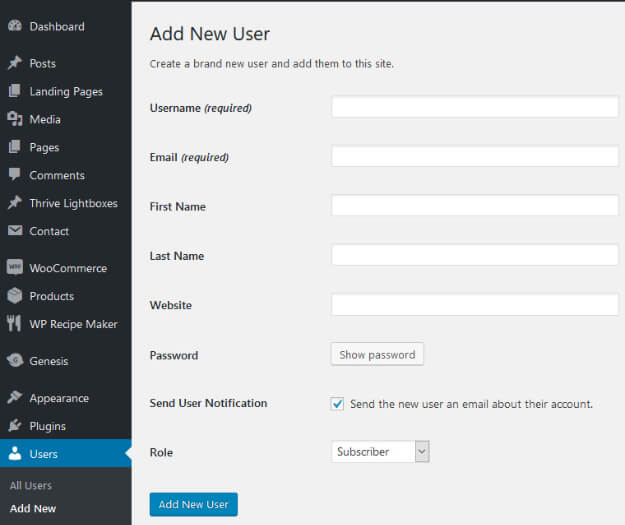
Step 4: Fill out at least the required areas (such as Username + email) and enter a secure password* for your new user.
*Click on the Show Password button and a strong password will be assigned that you can use, or you can highlight the assigned password and type in a different password. Don’t give the new user your own password, give them something different!

Step 5: Use the dropdown to see all user roles. Assign the new user with their ROLE (see summary of user roles below).
Step 6: Click on the Add New User button.
Step 7: Provide the new user with their username + password.
That’s it! Easy peasy.
Summary of User Roles
Administrator – can do everything, nothing is off limits**
Editor – has access to all posts, pages, comments, categories, tags and links
Author – can write, upload photos to, edit and publish their own posts
Contributor – has no publishing or uploading capability, but can write and edit their own posts until they are published
Note: Each user role is capable of everything that a less powerful role is capable of. (In others words, Editors can do everything Authors can do, and Authors can do everything Contributors can do.)
**The Administrator role can create more administrators, invite or remove users, and change user roles. They also have complete control over posts, pages, uploaded files, comments, settings, themes, imports, exports, and other users.
Nothing related to site-administration is off-limits for Administrators, including deleting the entire site. This is why I recommend having only one administrator per blog/site unless it’s a web developer doing work on your site – they would need full access.
I hope this post helps you better understand how to add a new user to your WordPress site… and which role should be assigned to your new user.

