
How to use Pinterest to drive traffic to your site
 Want to learn how to use Pinterest to drive traffic to your site?
STEP 1: Find out what people are pinning from your site.
The quickest (and easiest) way to figure out which pins from your site are being repinned is to go to Pinterest and type in the following URL: http://www.pinterest.com/source/yoursitename.com
(here’s mine, as an example: http://www.pinterest.com/source/yourmarketingbff.com)
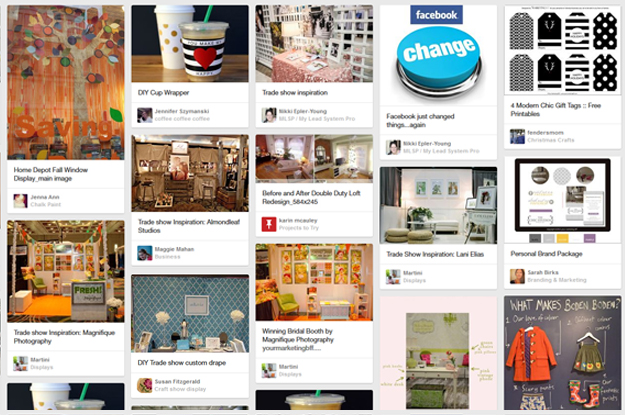
Here you’ll be able to see…
-the types of posts and/or pictures that are being pinned from your site.
-the number of repins, likes, and comments by people.
-how people ‘name’ your pins (which can give you an idea of how to categorize your images).
STEP 2: Understand some Pinterest key fundamentals
-Categorize your boards appropriately – call a spade a spade! It’s hard for people to find you if you use ‘creative spelling’ or ‘confusing categories’.
-Pin your own stuff. You won’t be punished for pinning your own posts and pictures, so have at it. (Note: Pinterest started growing quickly mid-2011, so a good idea is to go through some of your past posts and pin content and/or pictures that might be pin worthy prior to this time!)
-Pin others stuff too. Pinterest is a community and it’s important to support (comment + pin) others images if you want the favor to be returned.
-Make the descriptions on your pins short and catchy. I have to work on this…sometimes I explain too much. But you want to drive traffic to your site, not keep them on Pinterest.
-Pin from a blog post. You want your link associated with your image, not from a home page. I’ve also added a PIN IT button to each of my photos – to make it easy for readers to pin with just one click! (See image below)

-The most popular categories are home, arts and crafts, style/fashion, and food. Which is why I’ve started added some blog posts that combine these popular categories along with topics my readers want. You can see my example of this here “5 Product Photography Tips + Bonus Slider Recipe”.
-Sunday’s are when people are blowing up Pinterest! (Note: the activity peaks at 9pm)
STEP 3: Take ACTION…by making the necessary changes noted above that will drive traffic to your site
If your focus hasn’t been on producing great looking graphics or images with your posts, then start NOW! And if you haven’t been including images with your posts, this is a MUST!!!
Pinterest is my #3 top driver of traffic to my site (you can see my other top traffic drivers here!) https://yourmarketingbff.com/2013/10/top-7-reasons-to-use-google-analytics-on-your-website/
Today’s takeaway…Pinterest can be a powerful marketing tool and traffic driver to your site if you use it correctly!
Added bonus: Omnicore reached out to me and sent this great Pinterest Marketing Infographic “30 Reasons Why Pinterest Will Rule Social Media in 2014” to share with all of you. Thx Omnicore!

